
外观
Vue生命周期
作者:guo-zi-xin
更新于:2 个月前
字数统计:2.2k 字
阅读时长:7 分钟
vue2 的生命周期与 vue3 的声明是有所区别的,
vue2 的生命周期主要是:
beforeCreatecreatedbeforeMountmountedbeforeupdateupdatedbeforeDestroyDestroyed
而在 vue3 中, 在 vue2 的基础上做了一些改变, 主要是针对最后两个生命周期:
beforeDestroy->beforeunmountDestroyed->Unmounted
另外, options API 和 composition API 在生命周期上也有一些小的不同:
conposition API 提供了 setup 函数作为入口函数, 替换了 beforeCreate 和 created 这两个生命周期钩子, 并且setup()在两者之间执行。
所以在实际开发中, 我们可以简单地把 setup 理解为 created 来使用
Vue2
| 生命周期钩子 | 描述 |
|---|---|
| beforeCreate | 组件实例被创建之初 |
| createed | 组件实例已被完全创建 |
| beforeMount | 组件挂载之前 |
| mounted | 组件挂载到实例上去之后 |
| beforeUpdate | 组件数据发生变化,更新之前 |
| update | 组件数据更新之后 |
| beforeDestroy | 组件实例销毁之前 |
| destroy | 组件实例销毁之后 |
| activated | keep-alive 缓存的组件激活时 |
| deactivated | keep-alive 缓存的组件停用时调用 |
| errorCaptured | 捕获一个来自子孙组件的错误时被调用 |
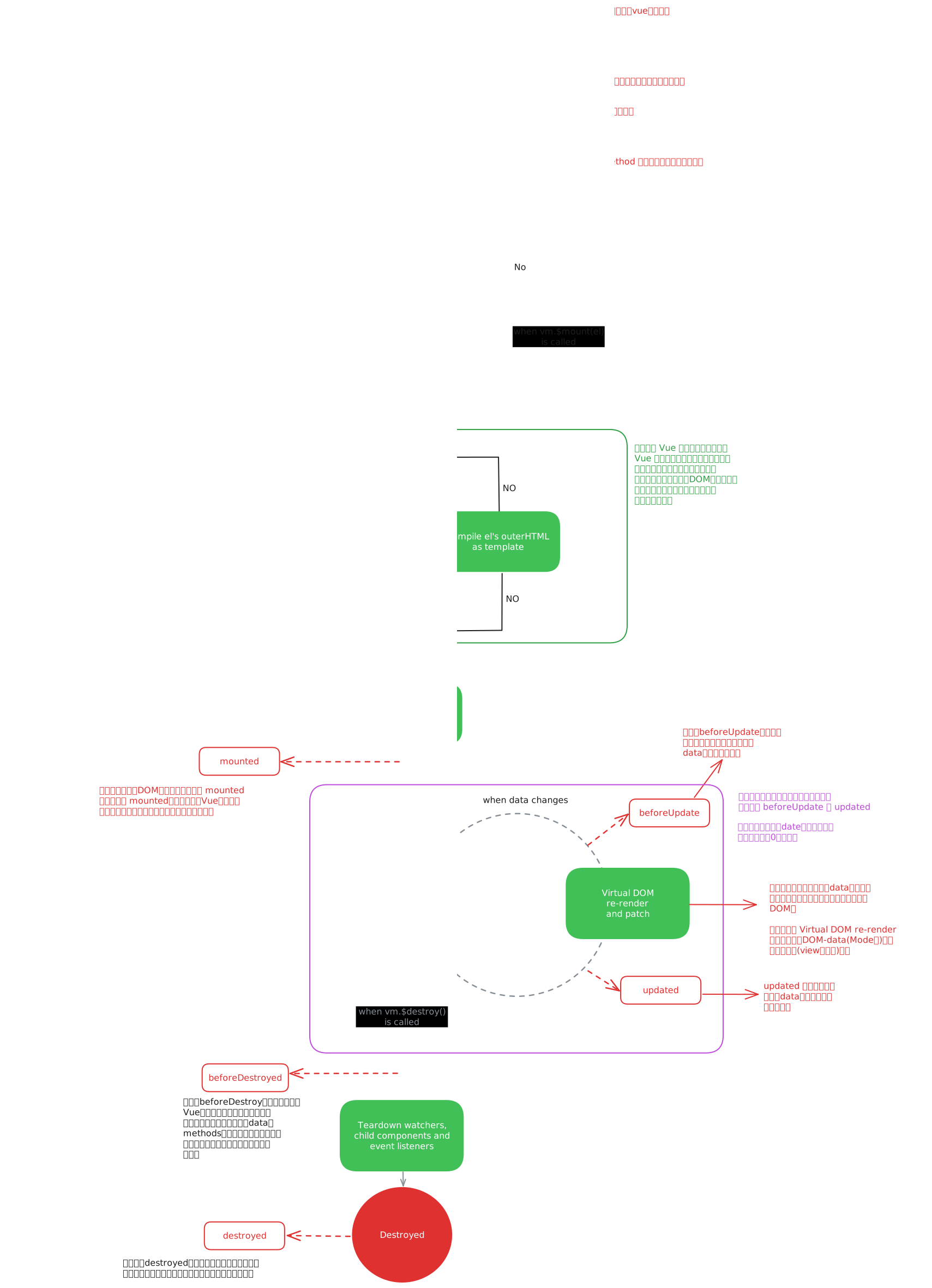
具体分析
beforeCreate -> created
初始化 vue 实例,进行数据观测
created
完成数据观测,属性和方法的运算,
watch、event事件回调的配置可调用
methods中的方法,访问和修改data数据触发响应式渲染dom可通过computed和watch完成数据计算此时
vm.$el并没有被创建created -> beforeMount
判断是否存在
el选项, 若不存在则停止编译,直到调用vm.$mount(el)才会继续编译优先级:
render>template>outerHTMLvm.el获取到的是挂载DOM的beforeMount
在此阶段可获取到
vm.el此阶段
vm.el虽已完成DOM初始化, 但并未挂载在el选项上beforeMount -> mounted
此阶段
vm.el完成挂载,vm.$el生成的DOM替换了el选项所对应的DOMmounted
此阶段
vm.el完成挂载与渲染,此刻打印vm.$el发现之前的挂载点及内容已被替换成新的DOMbeforeUpdate
更新的数据必须是被渲染在模版上的(
el、template、render之一)此时
view层还未更新若在
beforeUpdate中再次修改数据,不会再次触发更新方法updated
完成
view层更新若在
update中再次修改数据,会再次触发更新方法(beforeUpdate,updated)beforeDestroy
实例被销毁前调用,此时实例属性与方法仍可访问
destroyed
完全销毁一个实例,可清理它与其它实例的连接,接棒它的全部指令以及事件监听器
并不能清除DOM, 仅仅销毁实例
题外话:数据请求在created和mouted的区别
created是在组件实例一旦创建完成的时候立刻调用,这时候页面dom节点并未生成;
mounted是在页面dom节点渲染完毕之后就立刻执行的。触发时机上created是比mounted要更早的,
两者的相同点:
都能拿到实例对象的属性和方法。 讨论这个问题本质就是触发的时机,放在mounted中的请求有可能导致页面闪动(因为此时页面dom结构已经生成),但如果在页面加载前完成请求,则不会出现此情况。 建议对页面内容的改动放在created生命周期当中。
Vue3
在 Vue3 中, 除了 setup()替代了 created 和 beforeCreate 之外,
beforeMount 和 mounted 函数被替换成了 onBeforeMount 和 onMounted;
beforeUpdate 和 update 被替换为 onBeforeUpdate 和 onUpdate;
beforeDestroy和 destroyed被替换为 beforeUnmount 和 unmounted。
这些钩子函数的执行顺序与vue2的版本相同,但有所不同的是,在vue3中,它们是使用ES6类定义的。
| 生命周期钩子 | 描述 |
|---|---|
| setup | 替代了vue2中的 created 和 beforeCreate的作用 |
| onBeforeMount | 组件挂载之前 |
| onMounted | 组件挂载到实例上去之后 |
| onBeforeUpdate | 组件数据发生变化,更新之前 |
| onUpdate | 组件数据更新之后 |
| beforeUnmount | 组件实例卸载之前 |
| unmounted | 组件实例卸载之后 |
| activated | keep-alive 缓存的组件激活时 |
| deactivated | keep-alive 缓存的组件停用时调用 |
| errorCaptured | 捕获一个来自子孙组件的错误时被调用 |
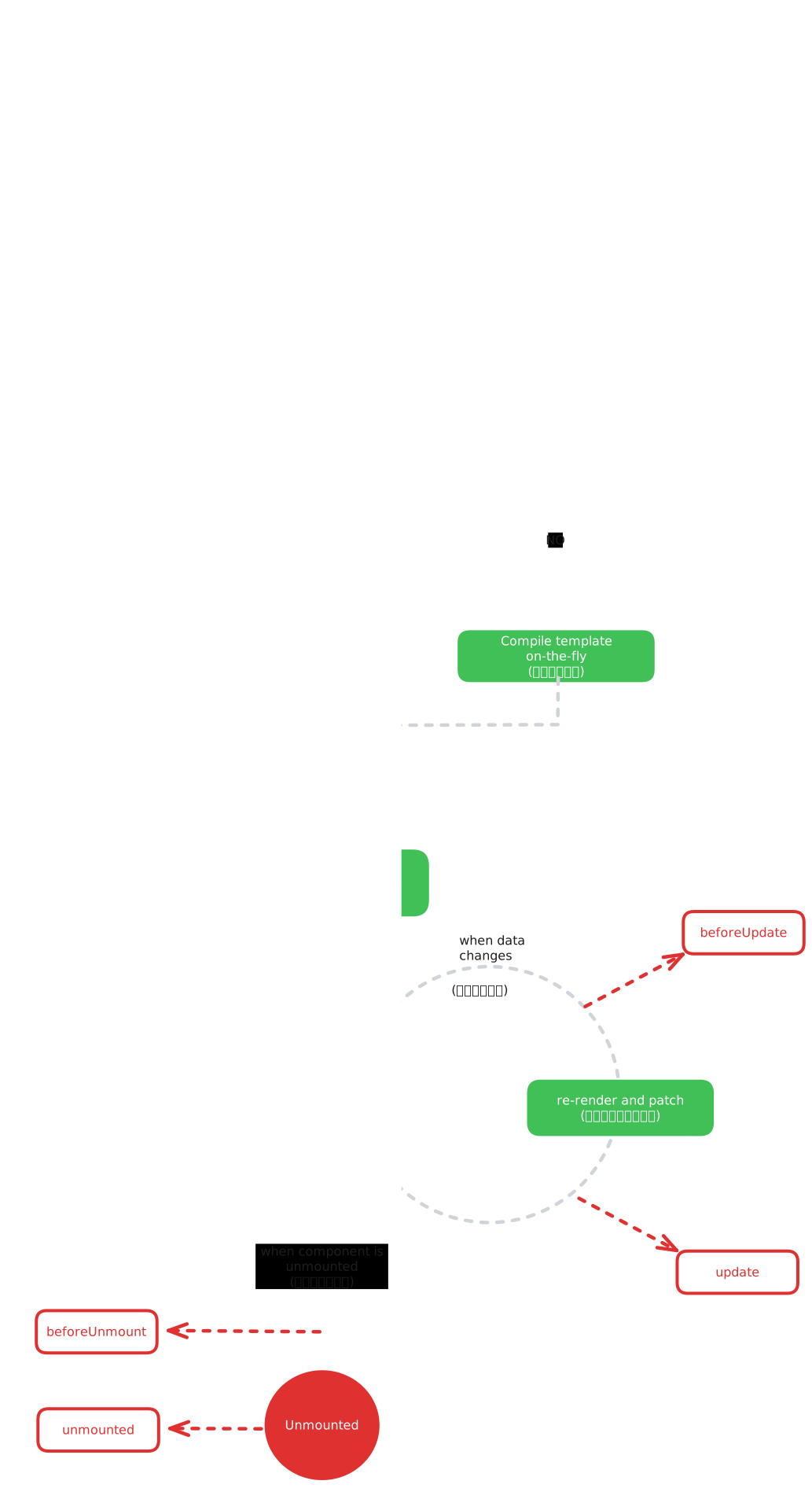
具体功能
setup
setup函数是一个全新的组件选项,它是 Composition API 的核心,用于初始化组件实例setup接收两个参数:props和context。 其中props是父组件传递给当前组件实例的属性,而context属性则包含了一些 helper 的方法和组件选项,(如attrs,slots,emit等)在
setup中, 我们可以使用Vue3提供多个工具函数来定义响应式数据,监听生命周期钩子,处理计算属性、声明事件处理函数等, 这些函数包括:reactive: 用于创建响应式对象ref: 用于创建一个单一的响应式值computed: 用于创建计算属性watch: 用于监听响应式数据的变化onMounted和onUpdate和onUnmounted: 用于监听生命周期钩子toRefs: 用于将响应式对象转换为普通对象inject和provide: 用于跨层级组件传递数据getCurrentInstance: 用于访问当前组件实例
使用
setup函数的优点是可以讲相似的逻辑组织在一起,便于代码的维护和重用。此外。setup函数需要返回一个对象,用于暴露组件状态和方法给模版使用, 因此也提高了代码的可读性和组件的封装性javascriptexport default { setup(props,context) { // 透传 Attributes(非响应式对象, 等价于$attrs) console.log(context.attrs) // 插槽,(非响应式对象,等价于$slots) console.log(context.slots) // 触发事件(函数,等价于 $emit) console.log(context.emit) // 暴露公共属性 console.log(context.expose) } }onBeforeMount和onMounted
onBeforeMount和onMounted都是 Vue3 中的生命周期钩子,它们分别在组件挂载之前和之后运行onBeforeMount
onBeforeMount钩子函数会在组件挂载到DOM前运行, 可以用来在组件挂载前执行一些初始化操作vue<script lang="ts" setup> import { onBeforeMount } from 'vue' onBeforeMount(() =>{ console.log('before mount') }) </script>onMounted
onMounted钩子函数会在组件挂载到 DOM 后运行, 通常用于获取数据和初始化页面状态等操作vue<template> <div>{{ message }}</div> </template> <script setup lang="ts"> import { onMounted, reactive } from 'vue' const state = reactive({ message: '' }) onMounted(() => { // 发送 AJAX 请求, 获取数据 fetch('/api/data').then(res => { res.json() }).then(data => { state.message = data.message }) }) </script>
需要注意的是
onBeforeMount钩子 和onMounted钩子需要在setup函数中使用onBeforeUpdate 和 onUpdated
onBeforeMount和onMounted都是 Vue3 中的生命周期钩子,它们分别在组件更新之前和之后运行onBeforeUpdate
onBeforeUpdate钩子函数会在数据重新渲染之前运行,可以用来在组件更新前执行一些操作vue<script lang="ts" setup> import { onBeforeUpdate } from 'vue' let count = 1 onBeforeUpdate(() => { console.log('before update', count) }) const handleClick = () => { count++ } </script> <template> <div> <p>{{ count }}</p> <button @click="handleClick">增加</button> </div> </template>在上面的示例中,我们通过
onBeforeUpdate钩子注册了 一个函数,在每次组件更新之前输出计数器数据的值,同时, 在方法中添加了一个按钮点击事件, 用于修改计数器的值onUpdated
onMounted钩子函数会在数据重新渲染后运行,通常用于更新 DOM 执行动画或获取最新的状态等操作vue<script lang="ts" setup> import { onMounted, onUpdated, ref } from 'vue' const message = ref('hello') onMounted(() => { // 模拟异步消息 setTimeout(() => { message.value = 'vue3' },2000) }) onUpdate(() => { console.log('DOM updated') }) const handleClick = () => { alert(message.value) } </script> <template> <div> <p> {{ message }} </p> <button #click=handleClick>获取最新的值</button> </div> </template>
onBeforeUnmount 和 onUnmounted
当组件不再被需要时, Vue3 将依次执行 beforeUnmount 和 unmount 钩子函数。 beforeUnmount钩子函数在组件卸载之前调用 通常用于处理一些事件监听器或者一些异步任务
Unmounted钩子函数在组件完全被卸载后调用,此时,组件可以回收内存等资源
onBeforeUnmount
onBeforeUnmount钩子会在组件卸载之前进行 通常可以用来清除定时器、取消事件监听器等操作vue<script lang="ts" setup> import { onBeforeUnmount, ref } from 'vue' const timer = ref(null) onBeforeUnmount(() => { clearInterval(timer.value) }) const startTimer = () => { timer.value = setInterval(() => { console.log('hello') }, 1000) } const clearTimer = () => { clearInterval(timer.value) } </script> <template> <div> <p>定时器示例</p> <button @click="startTimer">开始</button> <button @click="stopTimer">停止</button> </div> </template>onUnmount
onUnmounted钩子函数会在组件卸载后运行,通常用于清理一些资源或取消订阅。vue<script lang="ts" setup> import { onMounted, onUnmounted, ref } from 'vue' const message = ref('') let subscription = null onMounted(() => { // 模拟创建一个订阅 subscription = setInterval(() => { message.value = new Date().toLocaleTimeString() }, 1000) }) onUnmounted(() => { // 在组件卸载后取消订阅 clearInterval(subscription) }) const unsubscribe = () => { clearInterval(subscription) } </script> <template> <div> <p>{{ message }}</p> <button @click="unsubscribe">取消订阅</button> </div> </template>